It was just announced in JavaOne Japan that the JavaFX SceneBuilder Tool Beta is available for Download.
Immediately I downloaded the tool and made a few tests and it's really a great tool. You should also try since it's available for Linux, Mac and Windows.
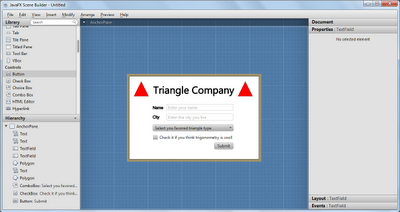
The tool in entirely in JavaFX and you can preview the changes in a minute. In the following screenshot you can have a look of the appearance of the tool when you open it.
 You can create application simply dragging and dropping the controls on left side to the center. Depending the control you selected you will be able to modify its properties on right side pane.
 There are lines that help you positioning components and aligning them. It makes easy create well known layouts such as Form Layouts.
 A cool and useful feature is the preview. You fan preview your application and there's no delay, the tool makes the preview immediately. Much better than spend time compiling and recompiling source code.
 Finally you can export the page to a FXML file and use it in your application. The tool is amazing! It's been neither 1 hour it was released and I finished a simple application with it. Of course I noticed a few small bugs while using the new JavaFX app, but they are very small bugs if you consider that the tool is still in beta phase.
Now JavaFX has all the keys to success: Open Source, easy, flexible, good tools, multi-platform, big and crescent community and, soon, multi-device, and me. Yeah, I'm back to have fun with JavaFX after a few months away.
Finally you can export the page to a FXML file and use it in your application. The tool is amazing! It's been neither 1 hour it was released and I finished a simple application with it. Of course I noticed a few small bugs while using the new JavaFX app, but they are very small bugs if you consider that the tool is still in beta phase.
Now JavaFX has all the keys to success: Open Source, easy, flexible, good tools, multi-platform, big and crescent community and, soon, multi-device, and me. Yeah, I'm back to have fun with JavaFX after a few months away.


Wonderful... I'm waiting it be integrated into NetBeans.
ResponderExcluir