Nowadays Artificial Intelligence is every day on the news. Actually not only in the news, almost every month we have some impressive scientific paper related to deep learning or machine learning as you can follow in Two Minutes Papers youtube channel. Consequently we many libraries and products based on AI, and as I Java programmer I highlight DeepLearning4J, Weka, Tensorflow, OpenNLP, Apache Mahout.
We can say that AI is already the new electricity for big tech companies, but what about your company or about your customers? How can Machine Learning or AI improve their business and how will you achieve that?
If you check the list of solutions I provided above you will notice that we may chose a library for a solution, but it does not fit well to solve other problems. For example, perhaps training a neural network to classify some customer feedback may not be the best solution, so you decided to use OpenNLP instead DeepLearning4J.
Another problem is dynamically update your machine learning model or pre-trained neural network in production. Let's say currently your model deployed in production has a precision of 87% and your AI specialists make it better with a precision of 88%. How you can make your model available for all productions systems that use it now? What about if you decide to change the provider from, let's say, from opennlp to deeplearning4j?
We've working on a project called KieML to provide a solution for these problems.
KieML is a project built on top of Kie API and is used on JBoss projects such as Drools, Optaplanner, and jBPM. Using KieML you can package your models in a JAR (also called kJAR), along with a kmodule.xml descriptor and models-descriptor.xml.
Notice the models-descriptor.xml should point to the model binary and possible labels. You can also provide specific parameters for your provider.
The kmodule.xml can also describe possible drools resources, but for KieML you can keep it with the following content:
xmlns="http://www.drools.org/xsd/kmodule">
Once the JAR is saved on the maven repository then you can use the API to load it:
Input input = new Input();
// load a file or use a text input
Result result = KieMLContainer.newContainer(GAV)
.getService()
.predict("yourModelId", input);
System.out.println(result.getPredictions());
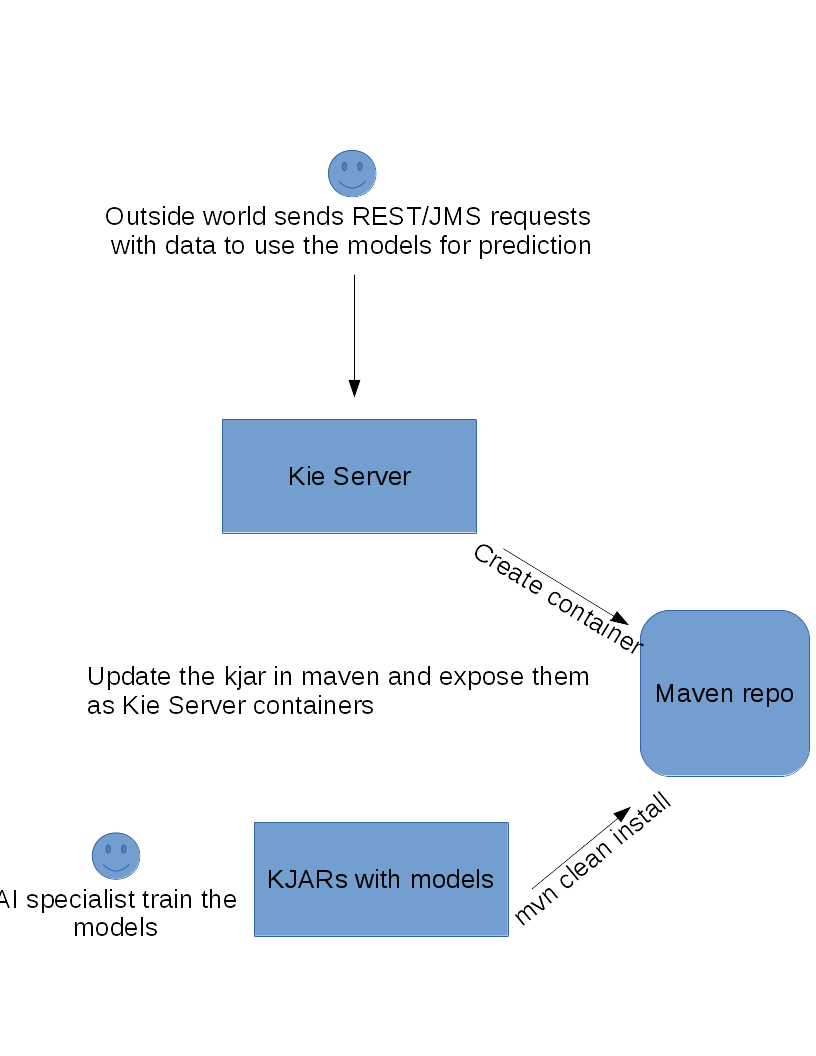
If you want to know more about extending Kie Server you can follow these great Maciej's serie of articles. KieML has also a client extension so that you can remotely call Kie Server using Java:
KieServicesConfiguration configuration = KieServicesFactory
.newRestConfiguration(" http://localhost:8080/rest/server", "kieserver", "kieserver1!");
KieServicesClient client = KieServicesFactory.newKieServicesClient(configuration);
Input input = new Input("some input");
KieServerMLClient mlClient = client.getServicesClient(KieServerMLClient.class);
System.out.println(mlClient.getModelList(CONTAINER_ID).getResult());
System.out.println(mlClient.getModel(CONTAINER_ID, "my model").getResult());
New models JARs can be places in a maven repository that you can manually copy to the production server maven repository (no maven installation is required, just the repository) or use a centralized nexus repository to push the new JARs. Using the KieScanner feature we can keep a published container updated with the latest version of a kjar.
Finally to make KieML available in the cloud you can build a Wildfly Swarm JAR and then deploy it on Openshift, Amazon EC2 or any other service that simply allow Java execution. You can read more about running Kie Server on Widlfly Swarm in this Maciej's post.
Kie Server is also easily managed from Drools/jBPM (or BPM Suite and BRMS) web console when it is used in managed mode and you can manage as many server as you want and put it behind a load balancer because KieML should work in a stateless way. Finally you may check the Kie Server documentation to learn more about its great REST/JMS and its Java client API.
If you want to try it now you just need maven and Java 8 because the source and instructions to build and run it locally are in my github. The project is in constant development and still on its early stages, every contribution, suggestion and comment is welcome!
I hope Kie team won't be mad because I took the "KIE" name for this project 0_0
We can say that AI is already the new electricity for big tech companies, but what about your company or about your customers? How can Machine Learning or AI improve their business and how will you achieve that?
If you check the list of solutions I provided above you will notice that we may chose a library for a solution, but it does not fit well to solve other problems. For example, perhaps training a neural network to classify some customer feedback may not be the best solution, so you decided to use OpenNLP instead DeepLearning4J.
Another problem is dynamically update your machine learning model or pre-trained neural network in production. Let's say currently your model deployed in production has a precision of 87% and your AI specialists make it better with a precision of 88%. How you can make your model available for all productions systems that use it now? What about if you decide to change the provider from, let's say, from opennlp to deeplearning4j?
We've working on a project called KieML to provide a solution for these problems.
KieML
KieML is a project built on top of Kie API and is used on JBoss projects such as Drools, Optaplanner, and jBPM. Using KieML you can package your models in a JAR (also called kJAR), along with a kmodule.xml descriptor and models-descriptor.xml.
 |
| models-descriptor.xml |
Notice the models-descriptor.xml should point to the model binary and possible labels. You can also provide specific parameters for your provider.
The kmodule.xml can also describe possible drools resources, but for KieML you can keep it with the following content:
xmlns="http://www.drools.org/xsd/kmodule">
Once the JAR is saved on the maven repository then you can use the API to load it:
Input input = new Input();
// load a file or use a text input
Result result = KieMLContainer.newContainer(GAV)
.getService()
.predict("yourModelId", input);
System.out.println(result.getPredictions());
KieML server
Since we are using Kie API we can extend Kie Server so you can easily manage your models using JMS or REST API.If you want to know more about extending Kie Server you can follow these great Maciej's serie of articles. KieML has also a client extension so that you can remotely call Kie Server using Java:
KieServicesConfiguration configuration = KieServicesFactory
.newRestConfiguration(" http://localhost:8080/rest/server", "kieserver", "kieserver1!");
KieServicesClient client = KieServicesFactory.newKieServicesClient(configuration);
Input input = new Input("some input");
KieServerMLClient mlClient = client.getServicesClient(KieServerMLClient.class);
System.out.println(mlClient.getModelList(CONTAINER_ID).getResult());
System.out.println(mlClient.getModel(CONTAINER_ID, "my model").getResult());
New models JARs can be places in a maven repository that you can manually copy to the production server maven repository (no maven installation is required, just the repository) or use a centralized nexus repository to push the new JARs. Using the KieScanner feature we can keep a published container updated with the latest version of a kjar.
Finally to make KieML available in the cloud you can build a Wildfly Swarm JAR and then deploy it on Openshift, Amazon EC2 or any other service that simply allow Java execution. You can read more about running Kie Server on Widlfly Swarm in this Maciej's post.
Kie Server is also easily managed from Drools/jBPM (or BPM Suite and BRMS) web console when it is used in managed mode and you can manage as many server as you want and put it behind a load balancer because KieML should work in a stateless way. Finally you may check the Kie Server documentation to learn more about its great REST/JMS and its Java client API.
If you want to try it now you just need maven and Java 8 because the source and instructions to build and run it locally are in my github. The project is in constant development and still on its early stages, every contribution, suggestion and comment is welcome!
I hope Kie team won't be mad because I took the "KIE" name for this project 0_0
Comentários
Postar um comentário