It's been a few months without any new post on this blog :( I was preparing an application using Infinispan, NoSQL and JavaFX and unfortunately I lost my data in the disc... That would an epic post!
In this post I'm going to show you a good old CRUD using FXML, JavaFX and the recent framework called Afterburner.fx, created by Adam Bien.
Write XML sucks, but don't in panic! FXML also offers a great tool to build the XML without having to write a single line of and I had the honor of being one of the first to blog about Scene Builder.


About Afterburner.fx
Afterburner.fx is a minimalistic (2 classes) JavaFX MVP framework based on Convention over Configuration.It's not me saying this, it's on afterburner.fx web page. What I can say I like the idea of this simple framework. I can say that it will not solve all issues, but it brings DI and the conventions saves from writing repetitive code.
What is FXML?
It's a declarative way to build JavaFX interfaces using XML. FXMLs declare elements using XML and you can relate it to a controller that will handle the view for you. The controller can have the view elements injected where you will be able to retrieve fields' values or modify the view. It's a clean way to separate the view from the logic. You can read more about this in this article.Write XML sucks, but don't in panic! FXML also offers a great tool to build the XML without having to write a single line of and I had the honor of being one of the first to blog about Scene Builder.
Server X Client
Our JavaFX client will be responsible to handle data in a server application which is built using JEE 6 technologies. We expose the CRUD functionalits using REST. It's a well known why to create remote applications. This same server will be used to create other ways to access the same CRUD functionality. Servlets, portlets, JAX-WS, Vaadin are the technologies that will be used in server too.
In server everything is mavenized and we use JDF sample applications to build the maven structure of our server project.
The client also use Maven, but we have to refer to two local files: The JavaFX runtime and an afterburner.fx snapshot.
So... What's different in this new CRUD?
For me it's the first project I used FXML. I highlight the following points of why you should take a look at this project code:
- It's a real-world application like because it uses JEE 6 and has server communication;
- It uses afterburner.fx, an interesting project IMO;
- The code need improvements :P
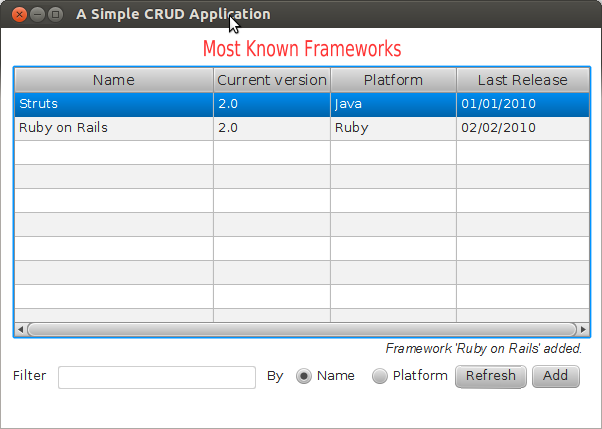
The application isn't visually attractive, but it allows the user to do all CRUD operation... see a few screenshot:


Conclusion
This is the first post of a series :) In other posts I'll show how to build it and talk a little about the code. One another post will be dedicated to show it accessing a rest service deployed in Openshift.
Ah, you want to see the code? OK, have it now.
Comentários
Postar um comentário